Menu
A client approves a monthly ad budget. Your job is to make it last through the whole month, spend it wisely, and finish close to the agreed amount. That sounds simple until you’re managing dozens of accounts across several platforms.
We know the work involved, because Adpulse started as an agency. Checking spend was part of the daily routine. If we spent the budget too quickly, we had to explain an overspend, stop campaigns early, or ask the client for more money. Spend too slowly, and the client missed opportunities their budget was meant to capture.
PPC budget pacing helps you catch either problem while there’s still time to act.
PPC budget pacing compares the percentage of an ad budget spent so far with the percentage of the budget period that has passed, showing whether spend is on track to use the budget by the end of the period. Agencies use it to monitor and manage ad spend against a client’s approved budget.
Most agencies work to monthly budgets, although the same approach applies to a week, a quarter, or a short promotion.
Halfway (50%) through a budget period:
So 100% pacing means you’re spending at the planned rate, not that you’ve used the whole budget. It doesn’t tell you whether the campaign is profitable or performing well. In Adpulse, figures above 90% and below 110% show as being on pace.
Pacing should also only count the days when the ads are scheduled to run. A Monday-to-Friday campaign shouldn’t be measured as though it also runs on weekends; otherwise, your pacing calculation will be incorrect.
For the full calculation and a worked example, see How is budget pacing calculated.
When a campaign spends too quickly, it can exhaust its budget before the month ends. If you don’t have automation set up to pause it, it can also keep spending beyond the budget. Either way, you may have to stop advertising while demand remains, or tell the client and ask them to approve more spend. If you’ve already exceeded the approved amount, lowering tomorrow’s budget won’t undo it.
Leaving money unspent can mean missing useful reach, clicks, or sales. Trying to catch up in the final few days gives you less time to spend it well. And if your agency charges a percentage of spend, underspend also affects your revenue. That’s a reason to monitor it, not a reason to buy traffic that won’t help the client.
Regular checks let you make regular smaller adjustments, which means minimal or no impact on bidding strategies. Less regular checks mean larger budget adjustments to keep pacing on track, which can impact bid strategy performance. You also risk getting stuck choosing between a large budget change and accepting that you’ll miss the target. Neither is as comfortable as spotting and fixing the drift early.
The client’s budget may be a fixed monthly amount, but the platform won’t necessarily spend the same amount each day. For most Google Ads campaigns, daily spend can reach twice the average daily budget. Check pacing over the budget period before treating a single high-spend day as a problem.

Start by comparing spend before and after the increase to see which campaigns / ad groups / asset groups / ad sets are spending more. Look for new or reactivated campaigns, changes to budgets or bidding targets, expanded targeting, or increases in traffic volume or cost. If spend hasn’t increased, check whether it was already too high for the approved budget or the budget target was recently reduced.
Depending on the cause:
You should also consider adding a spend-limit alert or some sort of automation to prevent overspend.
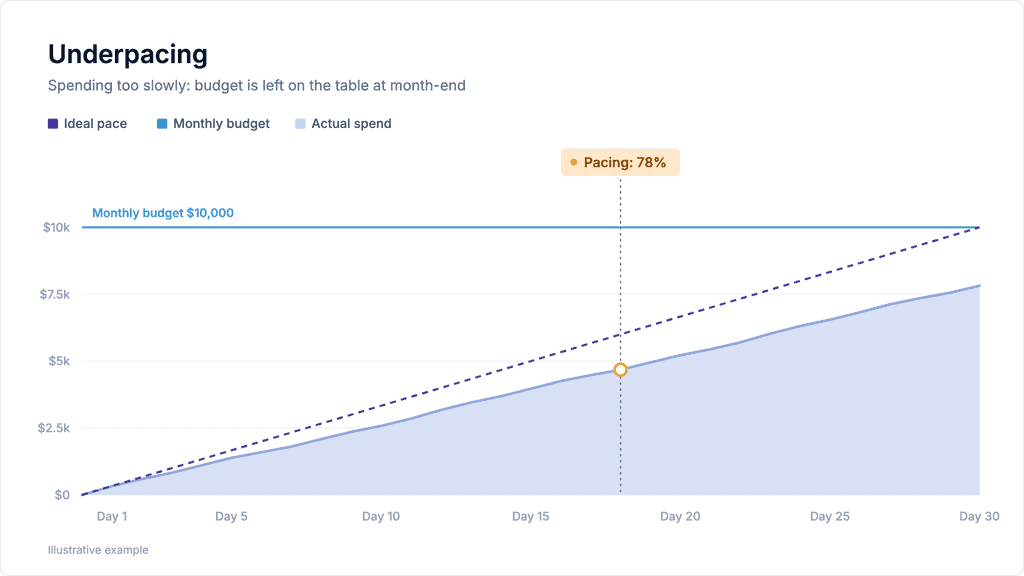
Look for a delivery problem before raising the budget. Are ads disapproved? Has a campaign been paused? Are the audience, bids or performance targets too restrictive?
Fix whatever is constrained – that might mean increasing bids, resolving a disapproval, widening targeting, or relaxing an overly restrictive target. Adding a suitable campaign can also help where the existing campaigns can’t reach enough demand.
A higher daily budget only helps if the current budget is limiting delivery. A campaign that can’t spend what it already has won’t necessarily spend more because you give it more. You could also create an overspend risk if delivery suddenly picks up while that higher limit is still in place.
A client might split one monthly budget between Google, Meta & TikTok. Checking each account separately doesn’t tell you whether their combined spend is on track.
Track the total against the client’s approved amount. Otherwise, an underspend on one platform can hide an overspend on another, or each platform can look reasonable while the combined spend misses the target.
In Adpulse, a single budget can include ad accounts from different platforms. That gives you one pacing figure for the client’s total, with budget automation available across all nine supported platforms.
Most ad platforms can’t help with understanding pacing, so you’ll need a spreadsheet or a budget management tool. Across a few accounts, manual checks may be enough. Across dozens, collecting spend and opening each account can take up much of your day.
Choose a method that lets you see which budgets need attention without having to check or adjust every account individually. And don’t rely on AI for something as important as budget pacing! We’ve all experienced an AI hallucination, and on something as pivotal as budget management, it can be very costly if it goes wrong.
A spreadsheet lets you bring spend and client budgets together. It can work well for a small portfolio, particularly if you already have a reliable way to import the data.
If you’re copying figures in by hand, though, the sheet is only as current as your last update. Formulas need maintaining, new accounts need adding, and someone still has to act on the results. There may be no software bill, but there is definitely a time cost.
A dedicated tool can collect spend automatically, compare it with the client’s budget, and show which accounts are off pace. Some (cough… Adpulse) can also adjust budgets or pause campaigns under rules you set.
You’ll pay for the software and need to connect your accounts. In return, you reduce the routine data work, reduce the risk of overspend, and manage any budget problems proactively. That trade-off becomes more useful as the number of accounts grows.
Adpulse is PPC budget management and pacing software built for agencies. It supports Google, Meta, Microsoft, TikTok, LinkedIn, Pinterest, Reddit, Amazon, and ChatGPT ads.
Budget data updates hourly, so you can check pacing whenever you need it. AutoPacing runs each night and adjusts campaign daily budgets toward 100% pacing. AutoRecommendations can also shift budget toward your best performers.
Two optional overspend controls let you set a threshold for each. AutoProtect pauses campaigns when spend reaches that threshold over the budget period. Daily Spend Limit pauses them when a day’s spend passes your chosen limit.
If your team prefers working in a spreadsheet, the Google Sheets extension pulls in Adpulse budget data on a schedule, as often as hourly.
The budget calculations and optimizations use token-free, deterministic automation rather than an AI model’s judgment. The MCP server is free, so you can also ask Claude, ChatGPT, or Gemini how your budgets are pacing without relying on a model to perform the underlying budget calculations.
Is budget pacing the same as forecasting spend?
No. Pacing tells you where you stand now; a forecast estimates where you’ll finish. Adpulse’s separate Forecast Spend figure uses the last seven days’ average spend.
How often should I check budget pacing?
At least daily, and after changes likely to affect delivery. Adpulse refreshes pacing data every hour.
What is a good pacing percentage?
As close to 100% as possible. In Adpulse, anything above 90% and below 110% shows as on pace.