Menu
You read right! Negative keywords for PMax campaigns are finally here! Since the introduction of PMax (Performance Max) campaigns, advertisers have lamented the fact that there was no easy way to block search terms from triggering ads. In fact, it’s been one of the barriers to PMax adoption for some advertisers and agencies. Given the widespread and growing acknowledgement of the increasing value of PMax to advertisers (albeit a little begrudging, given the lack of levers), this addition will be the ticket to balancing the power of the Google engine with the insight Google Ads managers have about the brands and advertisers they work with.
Previously, if you were lucky enough to have access to a Google rep, the only way to add negatives to PMax campaigns was via them, and even then only for brand terms. It’s great to see this capability being made both more broadly accessible and more robust at the same time.
This new functionality has been rolled out as part of a wider release, a release that now offers managers and advertisers the ability to create and apply account-level negatives that can be applied to all search and shopping inventory in Search, Performance Max, Shopping, Smart Shopping, Smart, and Local campaigns ????
Negatives can be critical for controlling where brand searches trigger or excluding search themes that are not appropriate for the advertiser, and having the option to add them at the account-level is a game changer. It will save time, and will reduce the risk of long-forgotten negatives blocking traffic in individual campaigns.
Adding negative keywords is simple. In your Google Ads account, go to Settings > Account Settings and click on the Negative Keywords section. From there, you can create a list of negative keywords by clicking the plus button and entering one word or phrase per line. You can also specify the match type between broad, phrase, or exact match types.
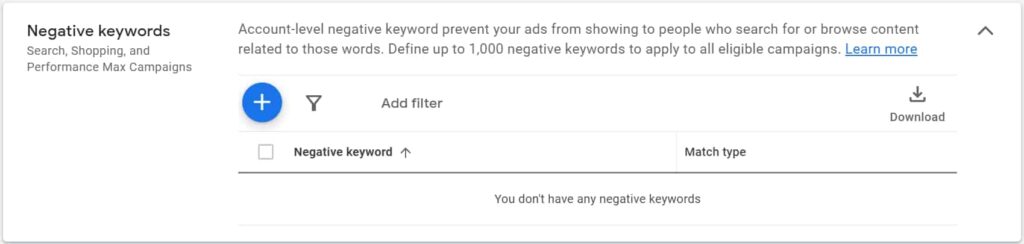
However, it’s important to note that there is a limit of 1,000 negative keywords that can be excluded for each account, so you’ll need to be selective about what you add as 1000 isn’t a huge allowance. If you just add exact matches you’ll likely use your 1000 up pretty quickly so you’ll probably want to lean more towards using phrase match to focus on blocking themes rather than specific terms.
As an example, you might have three search terms that include the word “free” but if you block all three individually, you’ve used up three of your 1000, so just block the word/phrase “free”, which uses up only one negative slot, and also blocks future “free” searches so you don’t constantly play whack-a-mole.
To remove or edit account-level negative keywords, you can use the same process in the Account Settings tab. You can either add a filter to search for specific terms or make inline edits by hovering over the keyword.
You can read more about the new Google account-level negatives here https://support.google.com/google-ads/answer/11396330 for the technical hoo-ha.
The ability to create and apply account-level negatives is a game changer, but the ability to add them to PMax campaigns goes even further – we know it will put PMax back on the table for many managers previously hesitant to trigger that campaign type.
We love talking PPC and spend most of our time chatting to agencies, so if you have a question please do drop us a line!
Also, Adpulse comes with a 14-day free trial, and right now the first month is only $19.99/mth, so it’s a low-risk way to try it for yourself. Sign up now!